Bringing building automation into SOA world
Archived post from 2012, recovered from my old blog. The technology described here is probably out of date. Original at the Internet Archive.
In one of my previous posts I wrote about the integration protocol of DOMIQ Base. Lets see how easily the home automation controller can be connected to an enterprise service bus. While it may sound like an abstract academical exercise it may actually find real life applications in a large intelligent systems like factories, smart cities, etc.
You may play with any ESB product on the market. I decided to use Mule ESB . Primary because its a mature open source software plus it has a nice integrated IDE with a graphical designer.
Lets consider publishing all intelligent building events to the ESB so that any service can react on it. What we need is:
- a polling TCP connector which establishes a connection to DOMIQ Base and listens for incoming messages
- a parser which splits each received line of text into a channel, a value and a timestamp – a groovy expression transformer may be used here
- any arbitrary processing logic to handle events
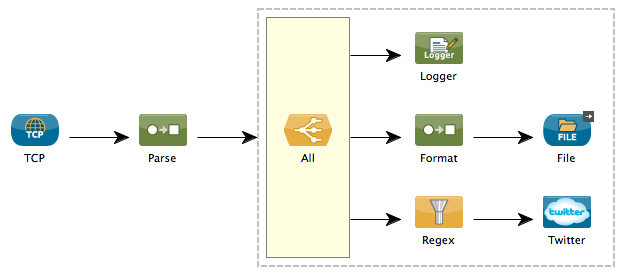
On the example flow each message is logged, then written to a text file and then if a message matches the filter expression it is published using Twitter. The configuration XML of the flow is attached below:
<?xml version="1.0" encoding="UTF-8"?>
<mule xmlns="http://www.mulesoft.org/schema/mule/core" xmlns:tcp="http://www.mulesoft.org/schema/mule/tcp" xmlns:twitter="http://www.mulesoft.org/schema/mule/twitter" xmlns:file="http://www.mulesoft.org/schema/mule/file" xmlns:doc="http://www.mulesoft.org/schema/mule/documentation" xmlns:spring="http://www.springframework.org/schema/beans" xmlns:core="http://www.mulesoft.org/schema/mule/core" xmlns:xsi="http://www.w3.org/2001/XMLSchema-instance" version="CE-3.3.0" xsi:schemaLocation="
http://www.mulesoft.org/schema/mule/tcp http://www.mulesoft.org/schema/mule/tcp/current/mule-tcp.xsd
http://www.mulesoft.org/schema/mule/twitter http://www.mulesoft.org/schema/mule/twitter/2.3/mule-twitter.xsd
http://www.mulesoft.org/schema/mule/file http://www.mulesoft.org/schema/mule/file/current/mule-file.xsd
http://www.springframework.org/schema/beans http://www.springframework.org/schema/beans/spring-beans-current.xsd
http://www.mulesoft.org/schema/mule/core http://www.mulesoft.org/schema/mule/core/current/mule.xsd ">
<tcp:polling-connector name="integrationConnector" timeout="0" doc:name="TCP Polling">
<tcp:custom-protocol class="domiq.SimpleTextProtocol"/>
</tcp:polling-connector>
<file:connector name="historyFile" outputPattern="domiq#[function:datestamp:yyyyMMdd].txt" outputAppend="true" doc:name="File"/>
<twitter:config name="myTwitter" consumerKey="MYKEY" consumerSecret="MYSECRET" doc:name="Twitter"/>
<flow name="flows1Flow1" doc:name="flows1Flow1">
<tcp:inbound-endpoint host="domiq" port="4224" responseTimeout="10000" connector-ref="integrationConnector" doc:name="TCP"/>
<expression-transformer evaluator="groovy" expression="x=payload.split('='); ["channel": x[0], "value": x[1], "timestamp": new Date()]" doc:name="Parse"/>
<all doc:name="All">
<processor-chain>
<logger message="#[payload:]" level="INFO" doc:name="Logger"/>
</processor-chain>
<processor-chain>
<expression-transformer evaluator="groovy" expression="payload.timestamp.format("yyyy-MM-dd HH:mm:ss.SSS") + "\t" + payload.channel + "\t" + payload.value + "\n"" doc:name="Format"/>
<file:outbound-endpoint path="/tmp" connector-ref="historyFile" doc:name="File"/>
</processor-chain>
<processor-chain>
<regex-filter pattern="^LCN.value.1" doc:name="Regex"/>
<twitter:update-status config-ref="myTwitter" status="This is a test message" doc:name="Twitter"/>
</processor-chain>
</all>
</flow>
</mule>The only Java code needed here is the SimpleTextProtocol class, a protocol implementation which treats input byte stream as lines of characters:
package domiq;

import java.io.BufferedReader;
import java.io.IOException;
import java.io.InputStream;
import java.io.InputStreamReader;

import org.mule.transport.tcp.protocols.AbstractByteProtocol;

public class SimpleTextProtocol extends AbstractByteProtocol {

	public SimpleTextProtocol() {
		super(true);
	}

	@Override
	public Object read(InputStream stream) throws IOException {
		BufferedReader reader = new BufferedReader(new InputStreamReader(stream));
		return reader.readLine();
	}

}
Please refer the documentation how to obtain Twitter oauth key/secret.
Thats it! You may then add any other components you wish to adjust the flow to your needs.